All guides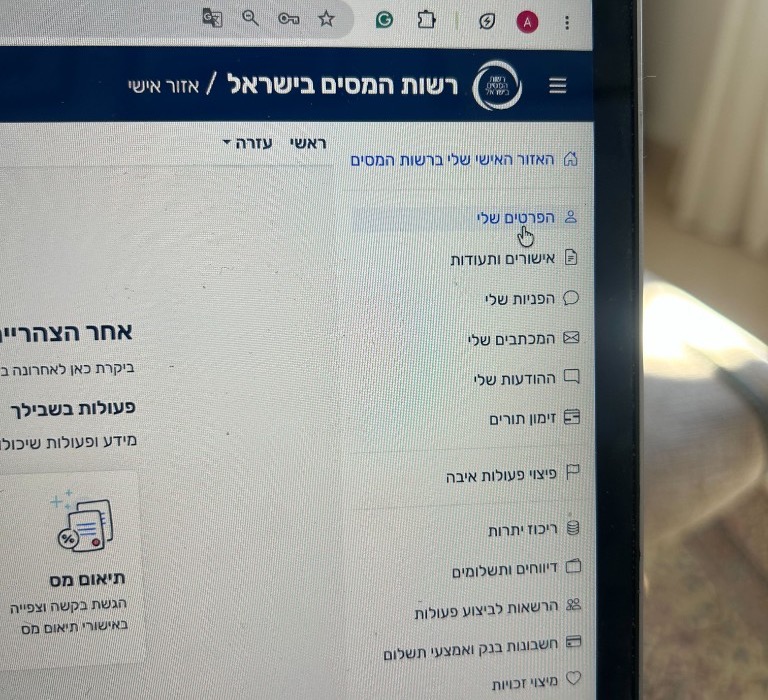
Select הפרטים שלי (My details) from the menu. 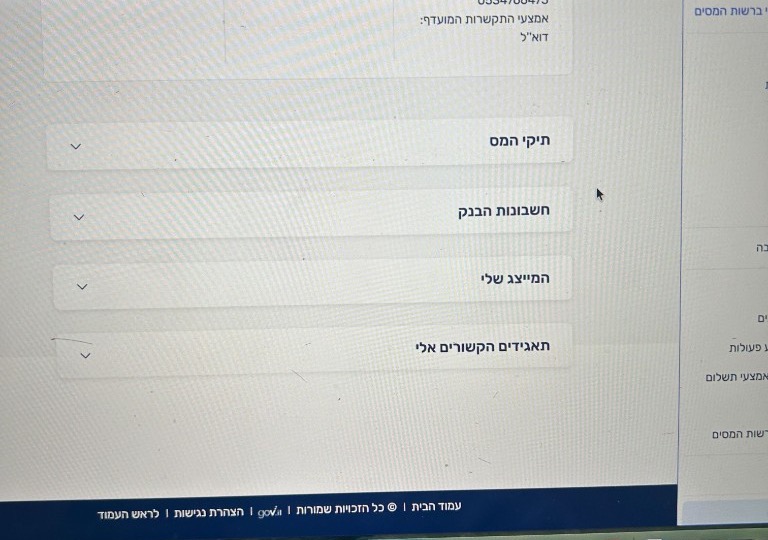
Scroll to המייצגים שלי (My representatives) and open the new request.
Authorization
How to Accept a Power of Attorney Request (ייפוי כוח)
Step-by-step guide to approve your CPA's Power of Attorney request in the Israel Tax Authority personal zone (אזור אישי) so your foreign-income refund claim can proceed.
Use the official Tax Authority personal zone to register, log in, download Form 106, or approve representation.
Log in to approve representationWhat this is
This confirms that your CPA can represent you with the Tax Authority for your refund claim. You must approve it before we can submit the claim.
Accept the request
- 01After your CPA sends the request, the Tax Authority will send you an SMS to let you know it is waiting for approval.
- 02Log in to your Tax Authority personal account (אזור אישי) using the button above.
- 03In the menu, select הפרטים שלי (My details).
- 04Scroll down to המייצגים שלי (My representatives).
- 05Open the new request and select the option to approve it.
Common problems
- No SMS? Check that the phone number on your claim is correct, then contact us so we can confirm the request was sent.
What to do next
- Once approved, your CPA can continue preparing your refund claim.